

Inside a Modern Digital Platform: Architecture Overview
· 3 min read
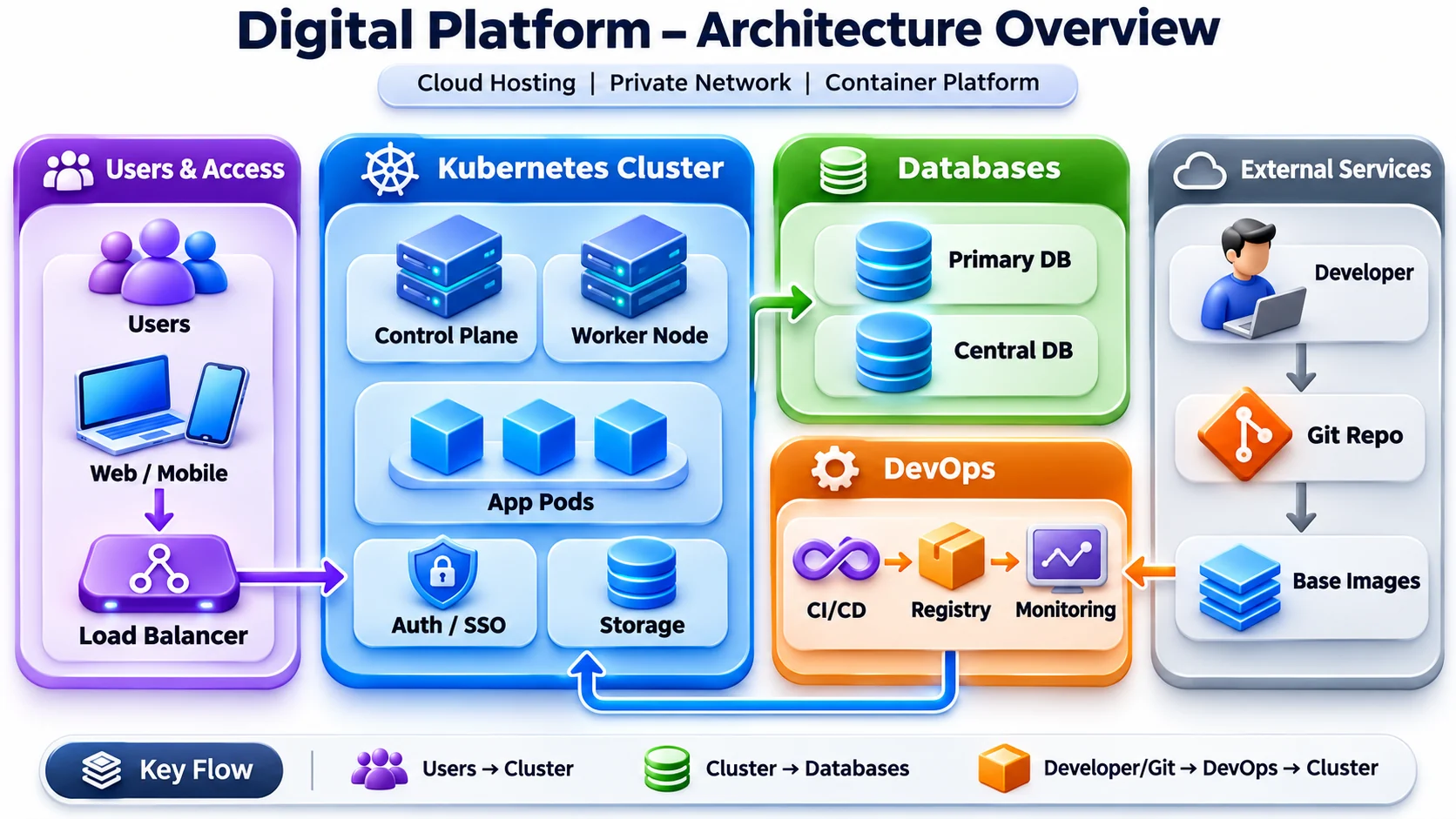
A good platform is easy to explain. If you can draw it on one page and walk someone through it in five minutes, it is usually easier to run, easier to secure and easier to grow. This post walks through the diagram above, one box at a time, and explains why each piece is there.
The platform sits on cloud hosting, inside a private network, and runs on a container platform (Kubernetes). Everything else builds on those three ideas.
1. Users and access
People reach the platform from the web and from mobile apps. Their requests do not go straight to a server. They first hit a load balancer.
- One front door. The load balancer is the only public entry point. The cluster, databases and tools stay inside the private network.
- Even spread. Traffic is shared across healthy app instances, so no single server gets overloaded.
- Health aware. If an instance stops answering its health check, the load balancer stops sending users to it. Users keep working while it recovers.
2. The Kubernetes cluster
This is where the applications actually run. Kubernetes keeps the platform in the state we describe, and repairs it when something drifts.
Control plane and worker nodes
The control plane is the brain. It stores the desired state (for example, "run three copies of the payments service") and schedules work. The worker nodes are the muscle. They run the containers. Adding capacity means adding a worker node; the control plane spreads the load onto it.
App pods
Each service runs in pods, usually several copies of each. With rolling updates, a new version starts, passes its health checks, and only then replaces the old one. That is how releases go out while users stay online.
Auth / SSO
Sign-in is handled in one place with single sign-on. Every service trusts the same identity system instead of building its own login. It is simpler for users and much easier to secure and audit.
Storage
Containers are disposable, but some data is not. Persistent storage keeps files and uploads safe when pods restart or move between nodes.
3. Databases
The cluster talks to two kinds of database:
- Primary DB for each application's own day-to-day data.
- Central DB for shared data that several services need, kept in one trusted place.
Databases sit in the private network and only accept connections from the services that need them. They get regular backups, and restores are tested, because a backup is only as good as the last time you restored it.
4. The DevOps pipeline
This is how a change goes from an idea to production, the same way every time.
- CI/CD. Every push triggers a pipeline that builds, tests and scans the code.
- Registry. The result is a versioned container image, stored in a private registry. Every environment runs the exact same image.
- Deploy. The pipeline rolls the new image out to the cluster with a rolling update.
- Monitoring. Dashboards and alerts watch the release. If something looks wrong, rolling back is just deploying the previous image.
5. Developers and external services
A developer writes code and pushes it to the Git repository. That push is what starts the pipeline. Applications are built on approved base images, so every service starts from a patched, trusted foundation instead of whatever happened to be on someone's laptop.
The three key flows
- Users → Cluster. Requests enter through the load balancer and reach healthy app pods.
- Cluster → Databases. Services read and write data over the private network.
- Developer → Git → DevOps → Cluster. Code becomes an image, the image becomes a release, and the release is watched by monitoring.
Why this design works
- Reliable. Multiple copies, health checks and rolling updates keep the platform online during failures and releases.
- Secure. One public entry point, a private network, single sign-on and trusted base images shrink the attack surface.
- Repeatable. Every change takes the same automated path, so releases are predictable and fast.
- Easy to grow. Need more capacity? Add worker nodes or more pod copies. The design stays the same.
A quick checklist for your own platform
- Is the load balancer your only public entry point?
- Do your services have health checks, and does traffic follow them?
- Is every release a versioned image in a private registry?
- Can you roll back in one step?
- Have you restored a database backup recently?
- Would an alert reach you before a user does?
If you can answer yes to all six, you are in great shape. If not, each "no" is a clear next step.