One-Way Traffic on a Site-to-Site VPN: How I Tracked Down an Asymmetric Routing Bug
· 3 min read
The problem
Early one Saturday morning, a payment integration with a partner bank stopped working. The partner connects to our cloud environment through an IPSec site-to-site VPN, and their transactions had suddenly started failing.
The confusing part: the VPN tunnel showed UP. Nothing looked broken at first glance.
Step 1: Read the tunnel metrics
The tunnel monitoring told the first real story:
- Packets Received: steady, normal traffic from the partner
- Packets Sent: dropped to zero at a specific moment and stayed there
- Packets with Errors: nothing unusual at that time
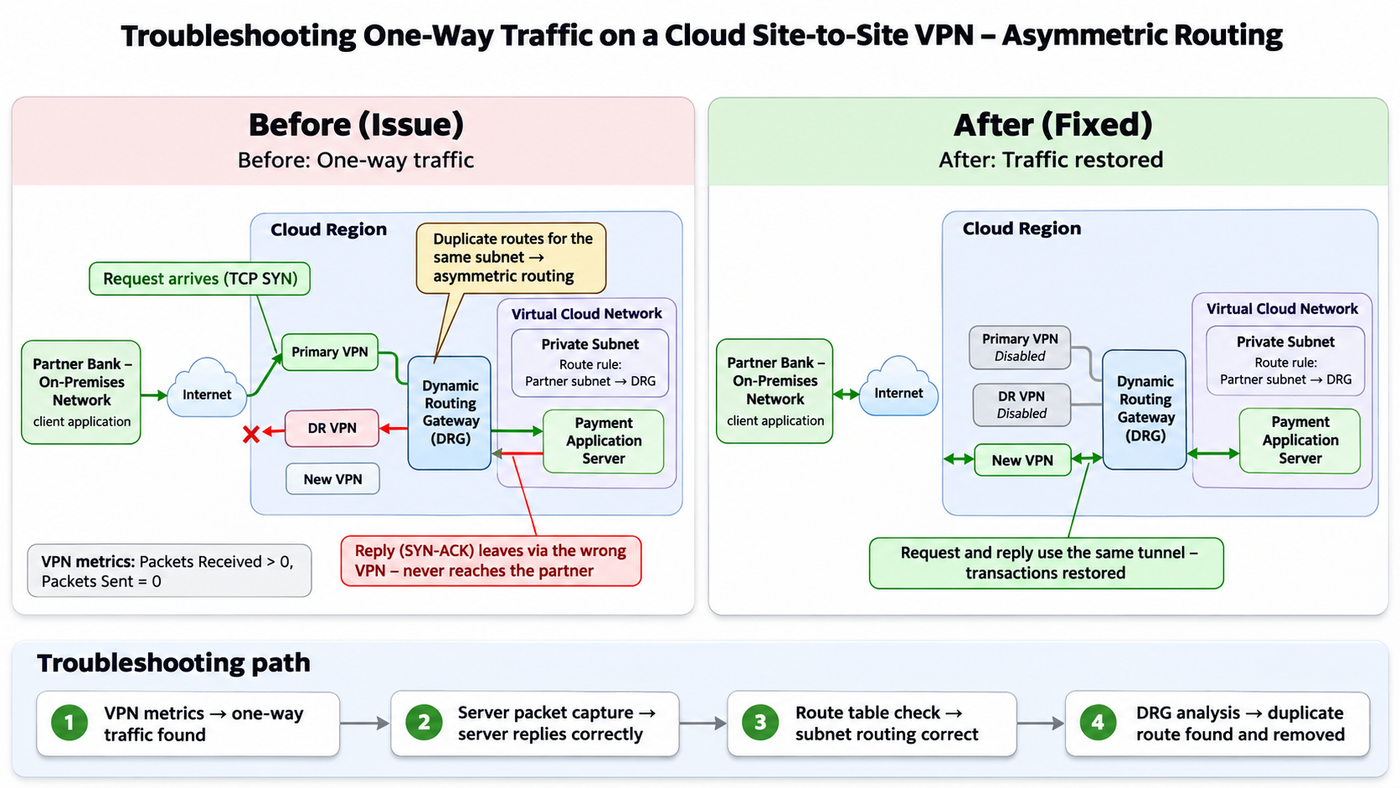
So the tunnel itself and the encryption were fine. Traffic was coming in, but nothing was going back out. This was a one-way traffic problem, not a VPN problem.
Step 2: Rule out a configuration change
My first suspicion was that someone had changed something. I went through the cloud audit logs for the time window when Packets Sent dropped to zero. Nothing: no route table edits, no security rule changes, no instance restarts.
Step 3: Prove the server is innocent
Next, I ran a packet capture on the application server:
sudo tcpdump -ni ens3 -e net <partner-subnet>
The result was clear:
- The partner's TCP SYN packets were arriving on our application port.
- Our server immediately answered with a SYN-ACK.
- The partner kept retrying the SYN, because our SYN-ACK never reached them.
Showing MAC addresses in the capture confirmed that the replies were leaving the server correctly and being handed to the cloud's virtual router, the same gateway the requests came in from.
I also checked the rest of the server side:
- Routing: replies go out through the correct gateway
- Firewall: the application port is open, no drops
- Docker networks: no overlap with the partner's private range
- Uptime: no reboot
Conclusion: the server was doing its job. The replies were being lost inside the cloud network, somewhere between the subnet and the VPN tunnel.
Step 4: Try a fresh tunnel
To rule out a broken tunnel, I created a brand-new IPSec connection, and the partner configured their side. It came up, received traffic… and still sent zero packets back.
This was an important clue. If a brand-new tunnel behaves exactly like the old one, the problem isn't the tunnel. It's the routing in front of it.
Step 5: Follow the route
I checked the subnet's route table, and the rule partner subnet → dynamic routing gateway (DRG) was there and correct. So traffic was reaching the DRG. The question was where the DRG sent it next.
The root cause: asymmetric routing
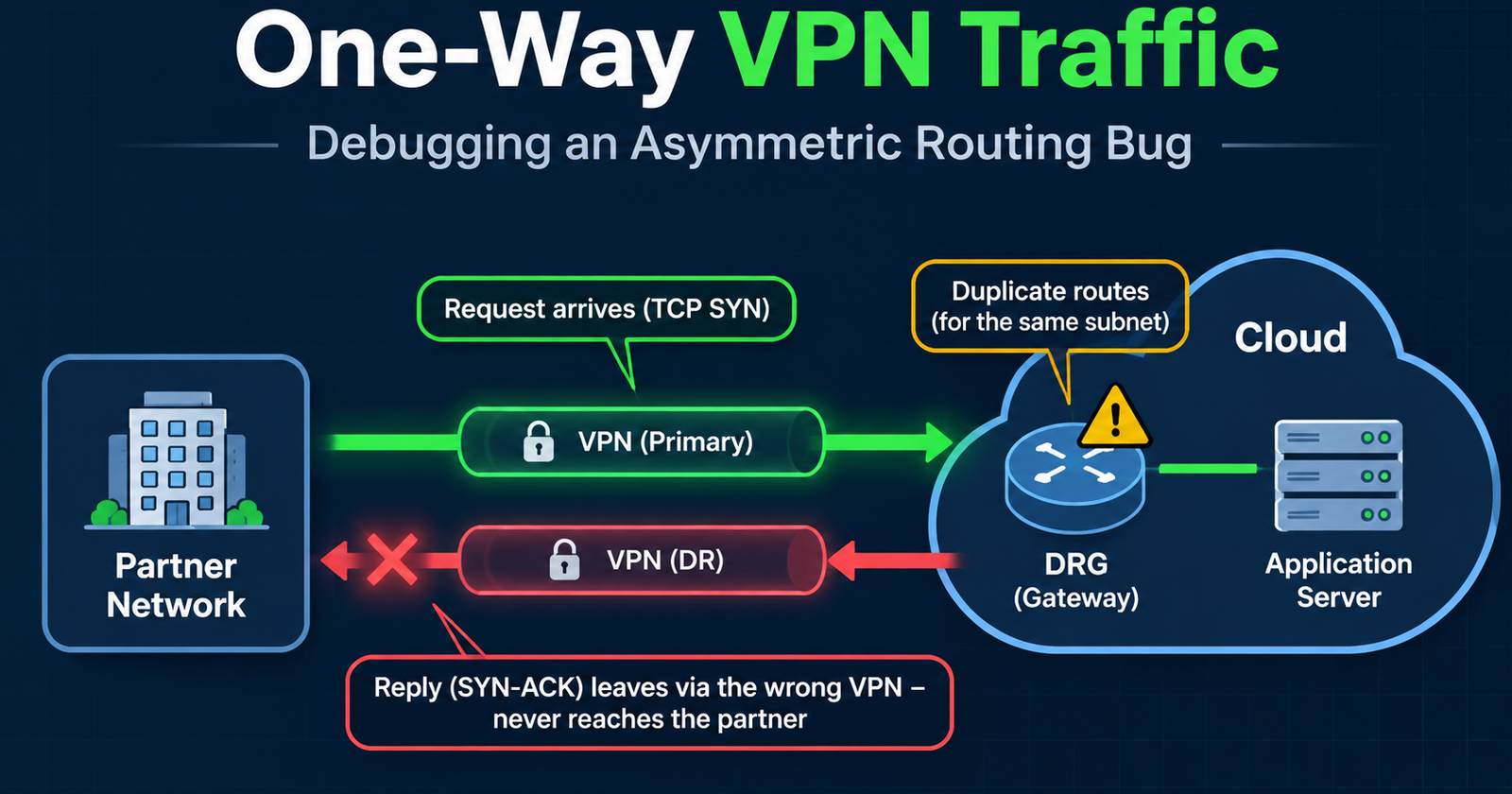
Working together with the cloud provider's network team, we found it: duplicate routes for the partner's subnet on the DRG.
Besides the primary VPN, a DR (disaster recovery) VPN attached to the same DRG was also advertising a route to the same partner subnet. The result:
- The partner sent requests through the primary VPN ✅
- The DRG sent the replies out through the DR VPN ❌
The replies took a different path than the requests and never reached the partner. That's classic asymmetric routing. And by creating a new tunnel with the same route, I had actually added another duplicate.
The fix
- Disabled the old primary VPN connection
- Disabled the DR VPN that was advertising the conflicting route
- Kept a single active VPN connection for the partner subnet
Within minutes, Packets Sent started climbing and transactions were flowing again.
Lessons learned
- "Tunnel UP" doesn't mean "traffic working." Always compare packets sent vs. received.
- tcpdump settles arguments fast. One capture proved the server was replying and moved the investigation to the network.
- If a new tunnel has the same problem, look upstream. The cause is shared by both paths: routing, the gateway or security rules.
- Watch out for overlapping routes, especially from DR setups. With static routing, two connections advertising the same prefix can silently create asymmetric paths.
- Use BGP or explicit route priority for primary/DR designs, so failover is deliberate rather than accidental.
- Share evidence, not guesses. Metrics screenshots and packet captures got the provider's team to the root cause quickly.
Takeaway
The issue looked like a VPN outage, but the tunnel was never the problem. Working layer by layer (metrics → server → route table → gateway) turned a vague "the VPN is broken" into a precise root cause and a clean fix.